
Time To Hit The Slopes
Score! It’s Time To Enjoy Your Ski & Ride Days
Information On Order Redemption & Frequently Asked Questions
Thank you for choosing to visit us at Saddleback this season. We can’t wait see you! If you need to reach our Ticket Office, please email orders@saddlebackmaine.com or call 207-864-5671 Ex. 101.
FAQ
Where do I find my buddy passes or vouchers?
- Sign in to your account at SHOP.SADDLEBACKMAINE.COM and navigate to “Account”.
- On a desktop the menu on the left will have a vouchers tab.
- On a mobile device tap “Click Here for More Account Options” to view the navigation menu.
- Select “Vouchers” and in the center of the page there are options for “My Product Vouchers” & “Other Vouchers”.
I’ve received a voucher number. How do I redeem or distribute my ski/ride day(s)?
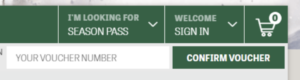
Score! You’ve received a day of skiing or riding at Saddleback. Follow these step-by-step instructions. Important: only share one voucher code per person.
- Go to SHOP.SADDLEBACKMAINE.COM
- Enter your voucher code in the box at the top of the screen titled “YOUR VOUCHER NUMBER”
- Click the CONFIRM VOUCHER button
- A voucher validation window will pop up, click REDEEM VOUCHER
- Pick the date the person is skiing/riding
- Pick the age of the person skiing/riding
- Click ADD TO CART
- You may continue shopping or CHECKOUT
- Once you have completed shopping, you will be requested to sign into your account.
- If you have not created an account since 11/10/2022, click CREATE AN ACCOUNT
- Complete the steps for creating an account
- Once you have signed into your account, you will need to assign the products to the guests skiing
- A drop-down list will allow you to ADD GROUP MEMBER or SELECT GROUP MEMBER
- When you click, ADD GROUP MEMBER, your family/friend group will open and here you will click ADD MEMBER and enter the details of your friend/family
- You will then assign the group member to the ticket
- You will have the ability to reload a Flow Card, if you have a new card, otherwise it is a $5 fee. Click CONTINUE
- The personalized page will request you to sign the general ski waiver and agree lift tickets are non-refundable. Once completed, click CONTINUE
- You will complete your purchase and receive an order confirmation. Sometimes these order confirmation emails go to spam, so if you don’t see the email right away, please check your spam folder!
- Go to the pickup box at the mountain located in the shed by the main entrance or within the ticket office, scan the code from your email, snag that freshly printed Flow Card, and you’re free to head to the lifts!
I’m picking up a college season pass. What info do I need to present?
If you’re picking up a college season pass, you must present proof of active enrollment (aka a letter from your institution’s registrar stating FT status and start and end dates). You must present this information at the Ticket Office and then we can issue your season pass.